 Calvyrn

Let customers book in a few taps, at any hour.
We build websites with online booking, so customers can see real availability, choose a time and get a confirmation without a phone call.
See Booking Websites working.
A short walkthrough of what happens, step by step.
Example demo. Names and details are illustrative.
A customer wants to book at 10 pm, long after you have closed.
Build projectBuilt for you. Can connect to messages and calls
What happens next
They pick a time, get a confirmation, and the booking appears on your calendar.
Click through three live builds.
Each one has its own design, layout and purpose. The brands are fictional, and the buttons, forms and data all work.
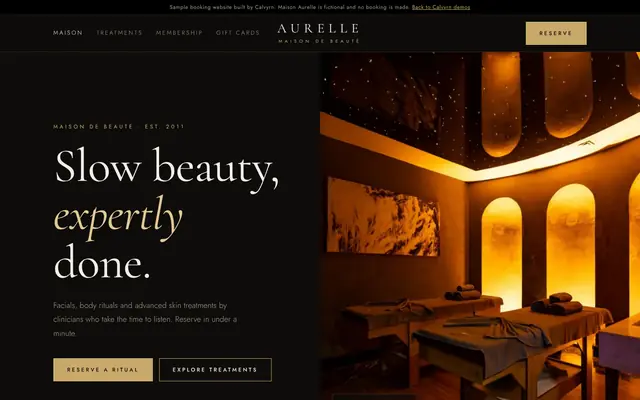 Booking website
Maison Aurelle
Med spa with a full booking engine, calendar slots, my bookings and gift cards.
Open the live sample Booking website
Pulse Studio
Fitness class timetable with live spots, waitlists, class packs and a cancellation window.
Open the live sample Booking website
Cedar Lodge
Boutique hotel booking with date-range availability, rate plans, add-ons and manage-my-booking.
Open the live sampleBooking Websites, slide by slide.
Everything you need to explain it to your team.
Customers want to book when they think of it.
Often that is after hours, when nobody can answer. Online booking captures the appointment at that moment and keeps your calendar accurate.
What is included.
The final scope is agreed in your proposal, before any work starts.
- Services, staff and locations set up your way
- Real availability from your calendar
- Confirmation and reminder messages
- Rescheduling and cancellation rules
- Deposits or online payment where you need them
- A simple admin view for your team
- Enquiry forms for jobs that need a quote first
Built to do its job well.
Real availability
Customers only see the times you can honour.
Fewer no-shows
Reminders go out before each appointment.
Your rules
Buffer times, working hours and limits are set by you.
Calendar in sync
New bookings appear where your team already looks.
Works on phones
Most bookings happen on a small screen.
Your team in control
Staff can view, move and manage bookings.
- Dental and veterinary clinics
- Med spas and salons
- Home service companies
- Consultants and coaches
- Rental hosts and property managers
Six steps, from first call to launch.
You approve the design before we build, and you always know what comes next.
Discovery
We learn your goals, users and must-have features, then send a clear proposal.
Design approval
You review the design and approve it before we start building.
Build
We build the agreed pages and features and keep you updated as they come together.
Testing
We test on real devices, check forms and key flows, and fix what we find.
Launch
We go live on your domain and confirm that everything works.
Support
We stay available for fixes, updates and new features as agreed.
Connect it to your automation.
Add the AI systems we build and manage, so your new project keeps working after hours.
AI Front Desk
An AI receptionist that answers calls, books them into your calendar and routes emergencies to a person.
Learn moreReputation & customer careReview Booster
After a job or visit, each customer gets a short, friendly request for a Google review, with a private feedback option if something went wrong.
Learn moreShort-term rentalsCheck-in & Checkout Messages
Every guest receives the right message at the right time: booking confirmation, arrival instructions with access details, a mid-stay check-in and a checkout reminder.
Learn moreWe build on the tools you already use.
Already on one of these? We build inside your account. Starting fresh? We recommend the best fit for your budget and volume, and everything stays in your name.
Front end
Back end
Hosting
Before you start.
Anything else, ask us on the call.
Can it connect to the calendar I already use?
In most cases, yes. We confirm the connection on your discovery call.
Can I take deposits?
Yes, where your payment provider supports it. We set the rules with you.
How long will it take?
It depends on the pages and features you need. We confirm the timeline in your proposal, before any work starts.
What does it cost?
It depends on the scope. We send a fixed written quote by email before any work starts.
What happens after launch?
We can stay on for fixes, updates and new features. What is included is set out in your proposal.

Tell us what you want to build.
Share your idea and we will reply within one business day with the next steps.
Start a project